How to Write a Social Media Policy for Your CPG Company

Yes, your company needs a social media policy! From a startup to a Fortune 100 company, you need a policy in place so your employees understand what is expected of them. At the end of the day, your employees are an extension of your CPG brand, from the janitor to your top executives. When they are out in the world they represent you – and part of that world now includes social media.

A social policy protects your company’s reputation online

Having a strong social media policy clears up any questions of what can and cannot be said about your company from an employee’s perspective.

A social policy can raise awareness for your brand

A policy isn’t just about restrictions, it’s also about what your employees can do. Their social media profiles and content can be used to enhance awareness of your brand. Your employees are likely your biggest cheerleaders. Giving them a policy that allows them to advocate for you in social can be a tremendous asset.

A policy encouraging use of social media helps attract top talent

Allowing employees to utilize social media will help you attract more talent to your company. Employees can showcase your company culture better than any corporate website and attract new employees that believe in your mission.

A social media policy helps to create consistency

By giving employees guidelines, such as how to talk about your CPG company, use of the logo, tagging the appropriate company/brand accounts, etc., ensures you’re all speaking from the same place.

We love Gap Inc.’s social media policy – it’s voicey, showcases their company culture, and shares both do’s and don’ts for their employees. We think it’s important in creating a policy for your employees that you find ways to be positive in the rules. (Not just giving everyone a list of “don’t do this!”)
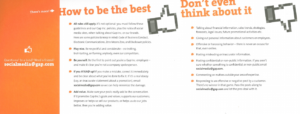
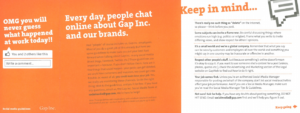
There are a ton of great examples of social media policies out there. Here are a few more of our favorites:

Best Buy Social Policy

Coca Cola Social Policy

AP Social Media Guidelines

Adidas Group Social Media Guidelines

Free Instagram Analytics Tools for CPG Companies

Instagram has become such an integral part of marketing for many CPG brands. There are so many reasons why your CPG brand should use Instagram, read more about our thoughts on the platform here.

We’ve put together a list of great analytics tools to use for reporting on your Instagram marketing efforts – we have to measure, right?!

*Note, we’ve used our social media director’s personal account for the screen shots.

  1. Instagram Insights

If you have switched your account to a business account, you’ll get access to Instagram Insights. Insights allows you to see some stats on your followers, when they’re on the platform and which are your top posts. This is going to help you create content that will resonate with your followers (and let you know when the optimal time is to post).

You will also be able to see reach, website clicks, total impressions and profile views.

Facebook Business (because Facebook owns Instagram), has a great walk through on Instagram Insights and how to use this functionality here.

  1. Social Bakers

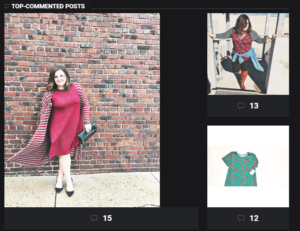
Social Bakers has a great free tool that will show you your top posts, filters, hashtags and all interactions with your followers.

We found that the visual aspect of Social Bakers is helpful – the top liked and commented posts are shown in images, so you’ll know right away which posts are your best. The ability to see which filters perform best is also key – it helps you to learn what catches your audience’s eye!

  1. Union Metrics

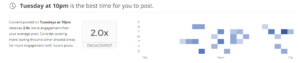
Union Metrics provides an Instagram “check up” for your accounts. This will tell you some key info:

  • Best time to post
  • Hashtags to use
  • What to post more of
  • Top fans

Our favorite feature from Union Metrics is the timing – knowing when to post to get the most engagement is key!

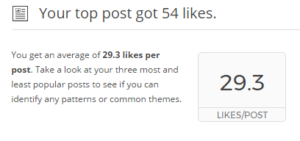
We also like the average likes per post feature, which is a great way to benchmark your account activity.

  1. Simply Measured

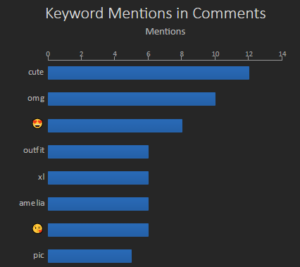
Simply Measured offers a robust tool for an overall look at your account. One insight we find helpful is the most used words in comments. This gives us an overall look at the general feedback we receive on an account.

If you need more information or help utilizing the analytics tools we’ve listed here, don’t hesitate to reach out to us. We’re happy to help!

Convert Your Instagram Account to a Business Account

Converting your Instagram account to a business account is easy and important. A Business Profile allows you to:

  • Add a phone number
  • Add an email address for your business
  • Include your business’ physical address
  • Contact button will appear on the profile
  • Users will be able to get directions, call, email your business
  • Most importantly, you get access to Instagram Insights!
To convert to a Business Instagram Profile:
  1. Go to your profile and tap the gear icon.
  2. Tap Switch to Business Profile.
  3. On the Connect Your Facebook Page screen, you’ll see all of the Facebook Pages you’re currently an admin on. Select the Page you’d like to associate with your Business Profile. Learn more about Page roles.
  4. On the Set Up Your Business Profile page, review your business’s contact information, make any changes and tap Done.

How CPG Brands Can Use Holidays in Social Media: April Edition

We love using holidays and “holidays” in social media content for our clients. Holidays, such as Easter and Passover, show that a CPG company is dialed in to being relevant and connected to its customers. But then there are “holidays” like National Peanut Butter and Jelly Day that can really showcase the personality, values, mission, etc., of your CPG brand.

Here are some of our favorite April “holidays” and a few ideas to get you started as you create content for your April social media posts.

April 1- April Fool’s Day

When it’s on-brand, April Fool’s Day is an amazing opportunity for a brand. You really want to be clever and funny to make a splash. Maybe it’s something related to your mascot or spokesperson? Perhaps your CPG brand claims that your number one seller is no longer being produced.

Here is a list of some of the best brand hoaxes from April Fool’s Day 2016.

April 1 – International Fun at Work Day

Okay, so maybe April Fool’s Day is off-brand for you. If it suits your company, showcase what it’s like to work for your company! Photos, behind the scenes footage, employee testimonials – it can all be part of illustrating your company’s culture.

April 2 – Children’s Book Day

For a CPG brand, this might seem off, however, if your company participates in any CSR activities related to children’s education or literacy, consider making a donation or building awareness for that cause on April 2nd.

April 2 – National Peanut Butter and Jelly Day

Where are you, food brands?! If you produce anything peanut butter or jelly related, this day is made for you. Get creative! Ask your fans to post pictures enjoying a PB&J with a branded hashtag. Create a contest asking fans to help come up with the next great PB&J combo.

April 7 – National Beer Day

Okay, so we are going to tread lightly with this one. If your CPG brand is alcohol related, and you are following all those rules on all the social media channels, which we already know you are, then you should absolutely create content around National Beer Day. Host tastings if you are a brick and mortar. Have a vote for your customers’ favorite brew.  If you aren’t quite sure how to handle this one on social media, feel free to reach out to our team and we’ll coach you through it!

April 16 – Easter

Okay, not so much a “holiday” but it’s one that should be acknowledged for your fans. A simple wish of a happy and healthy Easter will do.

April 17 – National Cheeseball Day

Does your CPG brand produce a product that could be used in a cheeseball? Create some recipes, have your fans create them for you, have an influencer or a group of influencers create some recipes. See how creative your employees can get!

April 27 – Take Your Daughter to Work Day

If your company participates in this day, share highlights on your social media! It’s a great way to showcase what your company believes in and in addition to how women are celebrated in your workforce.

In addition to these days, there are also month long holidays that might suit your brand:

  • Lawn and Garden Month
  • National Poetry Month (we see some poetry contests around your products this month!)
  • National Humor Month

Enhance Your CPG Brand’s Facebook Page with the Shop Now Button

For better or worse, Facebook is constantly updating the platform. While the changes can sometimes be frustrating, our team always considers the changes relative to what Facebook’s goals might be in making changes in the first place. We know user experience is a major priority for Facebook.

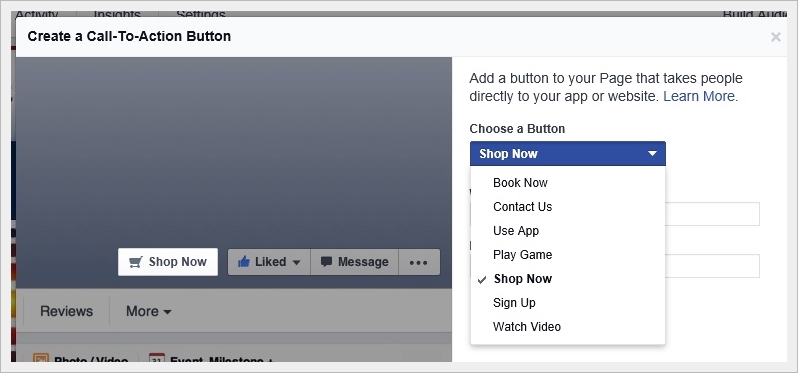
You will want to take advantages of the changes Facebook makes to business pages. They are intended to better the user experience for your CPG brand’s customers. This post will help you update your button, that appears at the top of your page. The button can land wherever you want it to – a contact form, a shopping experience, your main website.

To decide where the button should go, ask yourself, “where do I want to lead my customer? What is the most important action they can take with my CPG company?” Whatever the answer, that’s where you want it to lead. The intention of this button is for your page viewers to easily find a link to your site, to be able to shop your products, to contact, etc. We’ve detailed below exactly how you can get your Shop Now button ready for your customers to use.

How to Set Up Your Facebook Button

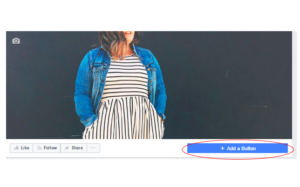
When you navigate to your Facebook business page, you will see an option just under the right hand side of your cover photo to “Add a Button.”

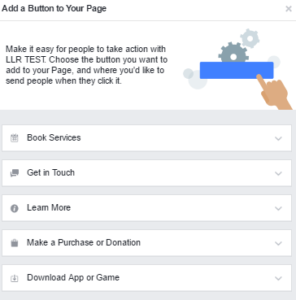
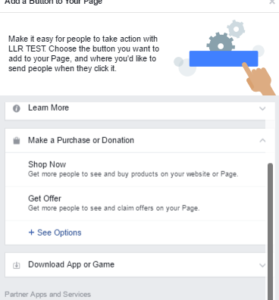
Click on “Add a Button.” A menu will appear, from which you begin to make your selection:
Select an Option

For the purposes of this post, we are selecting “Make a Purchase or Donation,” giving us the option to “Shop Now” or “Get Offer.”

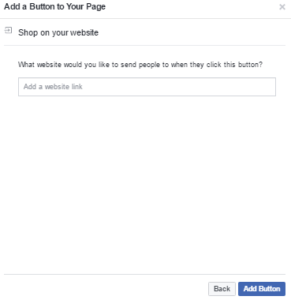
After selecting “Shop Now,” you are then able to enter your URL that will lead your customers to make a purchase.

Congratulations, you’ve got a Shop Now button!

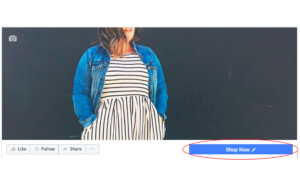
After entering your URL, you simply click “Add Button.” Once complete, you will see that under your cover photo it says “Shop Now.” This will lead to whichever URL you used for the button.

Test or Edit Button

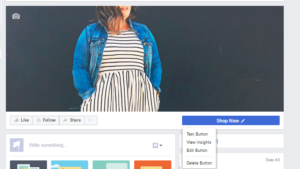
By hovering over your new “Shop Now” button, at any time, you will see a drop down. It gives you options to test, view insights (i.e., are people clicking on your button), edit button or delete your button.

Easy right?!